-

Your share of non-stop entertainment and more
One-stop-shop for 400+ live channels, TV shows, movies, recharge, managing channels & packs and technical support



Read what others usually ask us
Get your answer in our Frequently Asked Questions (FAQs)
- How do I set a reminder for a programme?
Reminders can be set for future programmes only.
To set a reminder for a programme, tap on the programme name. You will be able to see the set reminder button. Press the button to set a reminder. You will receive a notification on your device when it’s time for the programme.
- How do I watch Live TV on the App?
You can select any channel in the Live TV section or any live programme to view it Live on your device.
- Will I be able to access all the Set Top Box features like parental control, plan, etc. on Live TV?
No. Currently, Live TV service on your device offers only streaming of Live TV channels .
- Can I access Tata Play services such as 'Tata Play Fitness' and others in the Live TV section?
Yes, we have many Tata Play service channels live, like Tata Play Fitness, Tata Play Acting Adda etc.
- I am unable to access Live TV services?
Please ensure the below to enjoy uninterrupted access to Live TV:
- You have a device that supports Tata Play Mobile app.
- You are connected to the internet.
- If you are out of the country, you will be unable to use Live TV & Tata Play On Demand streaming services.
- Your Tata Play connection is in active state with sufficient funds in your account.
- You can access Live TV for only those channels that are part of your subscription package.
- Why are all the channels not available on Live TV?
Tata Play always keeps expanding its offering of channels on the Set Top Box. In a similar fashion, we will expand and bring more channels on Live TV soon.
You can only view those channels on Live TV which you have subscribed for viewing on the Set Top Box. To enjoy all the channels available on Live TV, you would need to subscribe to the respective channels on your Set Top Box as well.
- I have subscribed to a channel on the set-top box. Yet when I access this channel on my activated device I am getting the following message: “Sorry this programme is not available for viewing on Live TV”?
The broadcaster does not have the rights to stream this programme on mobile devices. The Live TV service on your device will resume once the next programme starts.
More convenience at your fingertips

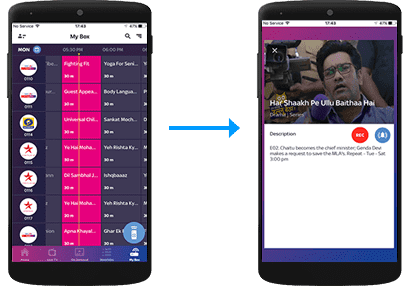
Remote Record
Record shows on a compatible Set Top Box directly from the Tata Play Mobile App.
Remote Record
Record shows on your Tata Play+ Transfer HD Set Top Box via the Tata Play Mobile App
Select the record icon

My Box
Record from My Box section

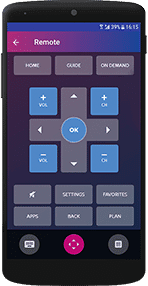
WI-FI Remote
Transform your iOS/Android device into a full remote, a gesture remote or a quick remote.
Tap on the Wi-Fi Remote icon
Do more with the Tata Play Mobile App

Live TV
Enjoy Live TV on the go! Stream 400+ Live TV channels. Watch, play and learn with our exclusive Tata Play services.


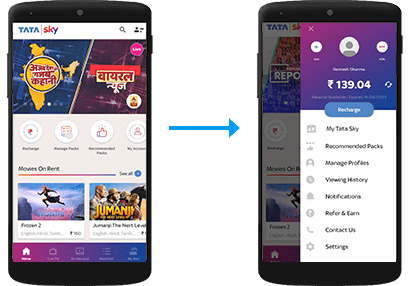
My Tata Play
Always be in control of your Tata Play account
Manage your account
View balance and due date, recharge, modify packs and channels, get recommended packs, and subscribe to Tata Play value-added services

Tata Play On Demand
Get access to hundreds of movies, shows, recordings of concerts, learning videos and more, on demand! Enjoy your purchased titles on all connected Set Top Boxes as well as Live TV activated devices.
Select the Tata Play On Demand icon.

NOTE: You can also call our helpline to activate Tata Play On Demand on your mobile device or log on to www.mytataplay.com (Mobile Services section) to select the mobile device/PC/Mac you wish to activate the service on.