-

Your share of non-stop entertainment and more
One-stop-shop for 400+ live channels, TV shows, movies, recharge, managing channels & packs and technical support



Read what others usually ask us
Get your answer in our Frequently Asked Questions (FAQs)
- What are the devices Tata Play Mobile App will be available on?
Tata Play Mobile App is available on Android phones & Tablets with the following minimum requirements
- OS version: 4.4 & above
- Minimum CPU: Dual core 1.2 GHz
- Minimum RAM: 1 GB
This service can be accessed through the Tata Play Mobile app available on the Google Play.
- I have Samsung S3 with version 4.0, can I use the app?
No. Tata Play service is accessible only through the Tata Play Mobile app on the devices and OS versions 4.4 and higher on Android and iOS 9 and higher in iOS devices.
- I have activated Live TV on my device but why do I see a message saying “This Device is not supported”?
Owing to Tata Play’s security agreement with content providers, Tata Play Mobile app is not supported on jailbroken/ rooted devices.
- Can I watch Live TV or stream videos via 3G/4G/Wi-Fi whilst a download is in progress?
Yes, although the quality of the Live TV or streaming of video will depend on the amount of 3G/Wi-Fi bandwidth available.
- What is the best resolution for viewing on the browser?
Website is best viewed on scren width > 1170 px (eg. 1366*768, 1280*800)
- Do I need an internet connection on my device to access Tata Play Mobile App?
Yes. You need to be connected to the internet to stream any video or view Live TV.
- What are the data charges that I would be charged with while accessing Tata Play Mobile app?
The data charges applicable would be as specified by your internet/mobile service provider. Please check with your internet /mobile service provider for the same.
More convenience at your fingertips

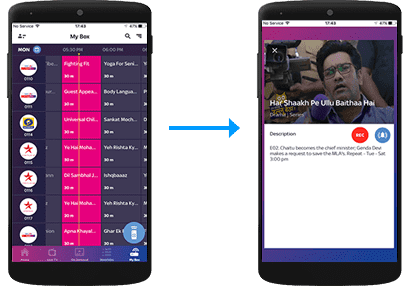
Remote Record
Record shows on a compatible Set Top Box directly from the Tata Play Mobile App.
Remote Record
Record shows on your Tata Play+ Transfer HD Set Top Box via the Tata Play Mobile App
Select the record icon

My Box
Record from My Box section

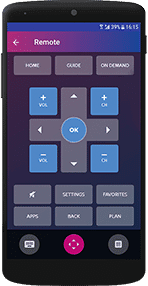
WI-FI Remote
Transform your iOS/Android device into a full remote, a gesture remote or a quick remote.
Tap on the Wi-Fi Remote icon
Do more with the Tata Play Mobile App

Live TV
Enjoy Live TV on the go! Stream 400+ Live TV channels. Watch, play and learn with our exclusive Tata Play services.

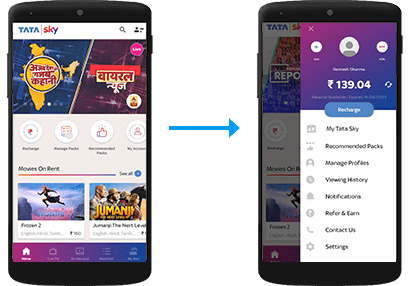
My Tata Play
Always be in control of your Tata Play account
Manage your account
View balance and due date, recharge, modify packs and channels, get recommended packs, and subscribe to Tata Play value-added services

Tata Play On Demand
Get access to hundreds of movies, shows, recordings of concerts, learning videos and more, on demand! Enjoy your purchased titles on all connected Set Top Boxes as well as Live TV activated devices.
Select the Tata Play On Demand icon.

NOTE: You can also call our helpline to activate Tata Play On Demand on your mobile device or log on to www.mytataplay.com (Mobile Services section) to select the mobile device/PC/Mac you wish to activate the service on.