-

Your share of non-stop entertainment and more
One-stop-shop for 400+ live channels, TV shows, movies, recharge, managing channels & packs and technical support



Read what others usually ask us
Get your answer in our Frequently Asked Questions (FAQs)
- Can I fast forward, pause or rewind videos?
Yes. You can fast forward, pause or rewind On Demand content. Just tap on the screen while viewing the video in full screen mode. Then drag on the progress bar to the position you wish to start viewing the video from.
- Is there a limit to the amount of times I can watch a video in Tata Play On Demand?
No. You can watch the video as many times as you wish.
- What is ‘My Tata Play’ section in the app?
My Tata Play section in the app is a self-care portal that gives you access and enables you to manage your Tata Play account. You can recharge your account, view and modify your packs and much more.
- What will I require to access the ‘My Tata Play’ section?
You will require your password used with mytataplay.com for the Subscriber Id used to log into the app.
- What if I do not remember the password for my Subscriber Id?
You can tap on ‘Forgot password’ to generate a new password.
- Do I get all the features and functionalities that are available on mytataplay.com?
Yes, you get all functionalities as available on mytataplay.com through the My Tata Play section in the app. This includes Recharge, Pack changes, etc.
- Is this service also available on Windows Phone & Nokia Symbian or Blackberry Phones?
No. Currently the service is only for selected supported devices mentioned above.
More convenience at your fingertips

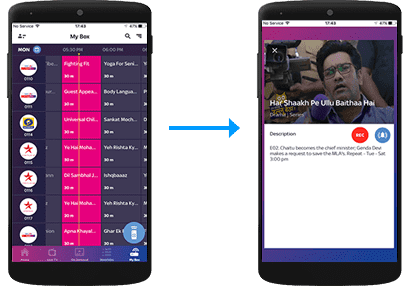
Remote Record
Record shows on a compatible Set Top Box directly from the Tata Play Mobile App.
Remote Record
Record shows on your Tata Play+ Transfer HD Set Top Box via the Tata Play Mobile App
Select the record icon

My Box
Record from My Box section

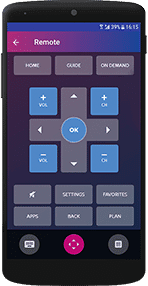
WI-FI Remote
Transform your iOS/Android device into a full remote, a gesture remote or a quick remote.
Tap on the Wi-Fi Remote icon
Do more with the Tata Play Mobile App

Live TV
Enjoy Live TV on the go! Stream 400+ Live TV channels. Watch, play and learn with our exclusive Tata Play services.


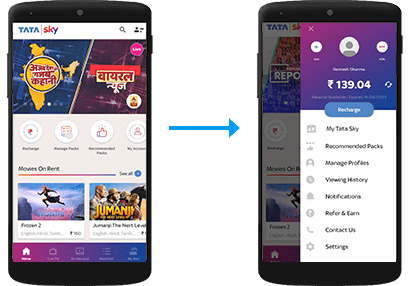
My Tata Play
Always be in control of your Tata Play account
Manage your account
View balance and due date, recharge, modify packs and channels, get recommended packs, and subscribe to Tata Play value-added services

Tata Play On Demand
Get access to hundreds of movies, shows, recordings of concerts, learning videos and more, on demand! Enjoy your purchased titles on all connected Set Top Boxes as well as Live TV activated devices.
Select the Tata Play On Demand icon.

NOTE: You can also call our helpline to activate Tata Play On Demand on your mobile device or log on to www.mytataplay.com (Mobile Services section) to select the mobile device/PC/Mac you wish to activate the service on.